What Is Wingdings? History, Architecture & Why It Breaks
What is Wingdings? To modern internet users, it looks like an arcane secret code or game easter egg. To software engineers and typographers, however, Wingdings is a landmark piece of digital computing history. Here is the technical reality behind how Wingdings was created, how its character mapping operates, why copy-pasting it creates total gibberish, and how modern web standards handle symbol fonts today.
The Origin Story: Why Microsoft Created Wingdings
In 1990, Microsoft was developing Windows 3.1. Personal computing was entering a visual renaissance, but hardware constraints were severe. Computer monitors had low resolutions, hard drives were measured in tens of megabytes, and consumer modems transferred data at agonizing speeds.
Everyday office workers needed visual icons for letters, invoices, and flyers—such as arrows, telephones, envelopes, and checkmarks. However, embedding raster images (like BMP files) into text documents significantly increased file sizes and slowed down printing.
To solve this problem, Microsoft licensed a collection of scalable vector glyphs from legendary type designers Charles Bigelow and Kris Holmes. The designers had originally drawn three distinct symbol families: Lucida Icons, Lucida Arrows, and Lucida Stars. Microsoft harmonized these collections into a single TrueType font package named Wingdings (combining the printer's term "dingbat" with "wing", evoking whimsy and flight) and bundled it into Windows 3.1 in 1992.
Urban Legends & Redesigns: In 1992, users discovered that typing NYC in Wingdings rendered a skull and crossbones (☠), a Star of David (✡), and a thumbs-up sign (👍). Though widespread conspiracy theories alleged hidden malice, Bigelow and Holmes confirmed that glyph allocations across the keyboard were entirely randomized during production. When Microsoft released Webdings in 1997, they deliberately hardcoded NYC to display an eye, a heart, and a city skyline ("I Love New York") to permanently dispel the myth.
How Wingdings Works: Font Substitution vs. Character Encoding
To understand what Wingdings is at a technical level, you must understand the distinction between character identity (codepoints) and glyph rendering (shapes).
Standard text fonts (such as Arial, Times New Roman, or Segoe UI) follow predictable character mappings: when a keystroke creates byte 0x41 (decimal 65), the font engine looks up the letter A and draws a capital 'A'.
Wingdings broke this rule through byte substitution:
- The underlying text data stored on disk remains standard ASCII Latin characters (e.g.,
0x41=A). - The TrueType font file remaps that exact byte slot to display a vector illustration instead (e.g., a victory hand sign ✌).
- Windows internally classified Wingdings as a
SYMBOL_CHARSETfont (charset ID 2), effectively telling the GDI rendering engine: "Ignore standard text semantics; draw the pictorial glyph at index N."
Because the stored characters are ordinary letters, changing the font dropdown in Microsoft Word back to Arial instantly turns the document back into readable English. Wingdings does not encrypt text; it merely dresses Latin characters in graphic costumes.
Why Copying Wingdings Breaks Across Platforms (The "Mojibake" Problem)
Nearly everyone who encounters Wingdings asks the same question: "Why does my Wingdings text revert to normal letters or turn into strange boxes when I paste it into Discord, Slack, or an email?"
This breakdown happens due to how operating system clipboards and modern Unicode applications handle text data:
| Step | Rich Text Environment (Word / InDesign) | Plain Text App (Discord / Web / WhatsApp) |
|---|---|---|
| Data Stored | Character byte (0x41) + Style tag (font-family: Wingdings). |
Raw character stream only (UTF-8 bytes 0x41). |
| Rendering Engine | Loads local Wingdings.ttf font file from system directory. |
Applies system sans-serif font (Roboto, San Francisco, Segoe UI). |
| Visual Result | ✌ (Victory sign glyph drawn from local font). | A (Plain capital Latin letter). |
| Portable Sharing | Fails if recipient lacks the font file installed locally. | Completely loses visual symbol identity. |
When you copy formatted text from Word, the clipboard stores multiple formats (HTML, RTF, and CF_TEXT). If you paste into an application that only accepts plain text, the formatting metadata is stripped away. Without the font tag instructing the software to load Wingdings, the receiving program falls back to standard unicode decoding, displaying plain Latin characters.
How Unicode Solved the Dingbat Conflict
To eliminate font-dependence and prevent broken symbol transfers, the Unicode Consortium introduced standardized character blocks for pictograms and symbols:
- Dingbats Block (
U+2700toU+27BF): Directly codified scissors (✂), hands (✌), crosses (✠), stars (★), and pencil icons into permanent universal codepoints. - Miscellaneous Symbols (
U+2600toU+26FF): Standardized astrological signs (♈, ♋), weather glyphs (☼, ❄), and smiling/frowning faces (☺, ☹). - Private Use Area (PUA): In older versions of Windows NT, Wingdings glyphs were mapped to the PUA block (
U+F020toU+F0FF). However, because PUA characters have no standardized cross-platform definitions, sending them to mobile devices produced blank rectangles ("tofu").
Today, when you use our Wingdings Translator, the tool automatically replaces legacy byte substitution with genuine, cross-platform Unicode characters. When you paste those characters into modern social media apps or messaging platforms, they remain intact on iPhones, Android devices, Linux workstations, and Mac computers without requiring any custom fonts.
The Extended Wingdings Family Comparison
Following the massive success of the original font, Microsoft created three specialized companion dingbat typefaces. Understanding their differences is essential for accurate decoding:
| Font | Year | Primary Focus & Glyphs | Best Used For |
|---|---|---|---|
| Wingdings (Wingdings 1) | 1992 | 224 glyphs: hand gestures, zodiac signs, office items, flags, and crosses. | Classic desktop symbols, retro aesthetic, pop culture decoding. |
| Wingdings 2 | 1996 | Circled digits (① to ⑩), ornamental border elements, decorative crosses. | Checklists, numbered workflows, typographic dividers. |
| Wingdings 3 | 1996 | Directional arrows (simple, striped, diagonal, double-headed), triangles. | Wayfinding diagrams, technical flowcharts, navigation signs. |
| Webdings | 1997 | Internet-era icons: web browsers, audio controls, buildings, vehicles, weather. | Early HTML web button graphics and multimedia controls. |
How to Use & Decode Wingdings Correctly Today
Depending on your project, here are the three recommended ways to interact with Wingdings in modern workflows:
- Use an Online Unicode Translator: If you want to post Wingdings messages on Twitter, Reddit, or Discord, use our Online Wingdings Translator. It translates English sentences into universal Unicode dingbats that never revert to Latin letters.
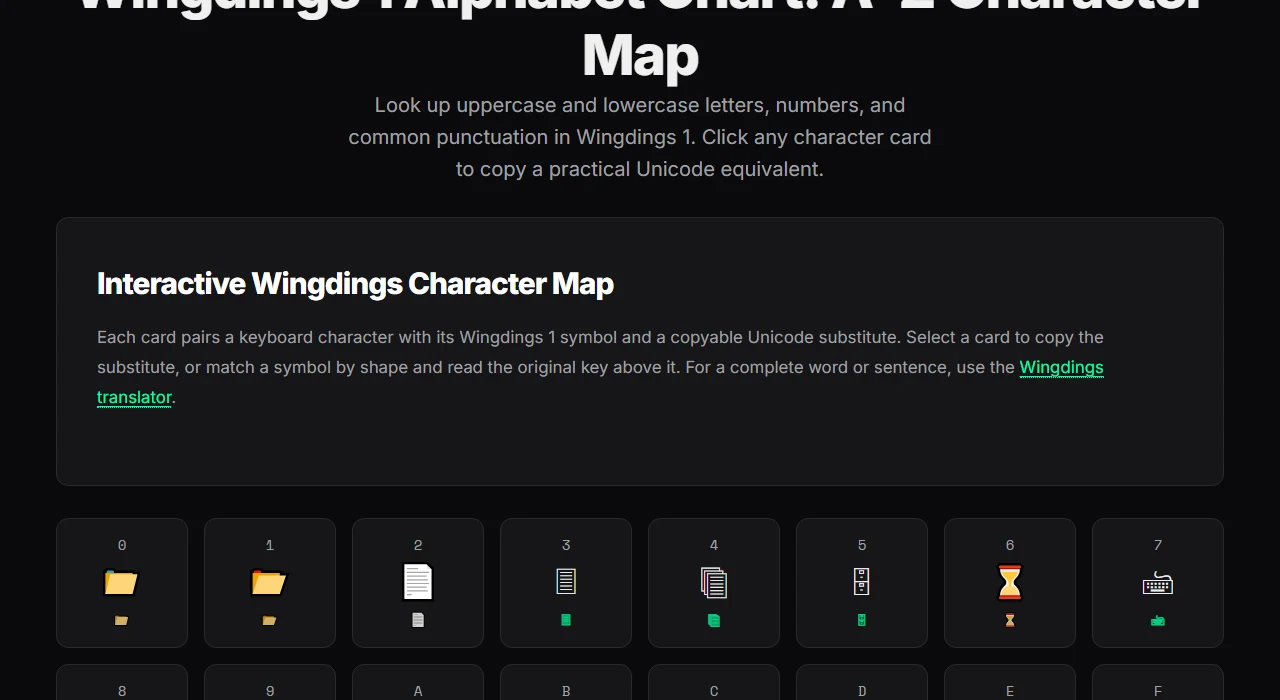
- Consult an Interactive Character Grid: If you need to identify an unfamiliar symbol from an image or game puzzle, open the Wingdings Alphabet Chart to see exact key mappings, descriptions, and copyable symbols. For manual decoding techniques, read our step-by-step tutorial on how to read Wingdings.
- Desktop Typography: If you are authoring print documents in Microsoft Word, open
Insert > Symbol > More Symbolsand select the Wingdings family. See our tutorial on how to find Wingdings in Word for character codes and Alt shortcuts.
Frequently Asked Questions
What is Wingdings?
Wingdings is a decorative dingbat TrueType font released by Microsoft in 1992. It replaces ordinary typographic letters with scalable vector illustrations such as arrows, office equipment, zodiac signs, and geometric shapes.
Who designed Wingdings?
Wingdings was designed by award-winning typographers Charles Bigelow and Kris Holmes, synthesized from their earlier Lucida Icons, Lucida Arrows, and Lucida Stars typefaces.
Is Wingdings an encrypted secret language?
No. While popular culture (notably Undertale's W.D. Gaster lore) treats Wingdings as an encrypted language, it is simply a 1-to-1 keyboard glyph substitution font. Learn more in our breakdown of what language Gaster speaks.
Why do Wingdings symbols change to letters when I paste them?
Copying legacy Wingdings text copies the underlying ASCII Latin byte values, not the pictorial artwork. When pasted into plain-text applications that lack font-family styling, the receiver's default system font displays standard English characters instead.
Explore More Tools: Ready to experiment? Try our free Wingdings Translator or explore the full Wingdings symbols directory to copy any character instantly.