English to Wingdings: How to Convert, Copy & Paste Symbols Anywhere
Converting English to Wingdings takes less than five seconds once you understand the crucial distinction between local font styling and portable Unicode symbols. If you highlight text in a word processor, switch the font face to Wingdings, and paste it into Discord, Google Docs, or Instagram, your secret symbol message immediately reverts into plain English letters.
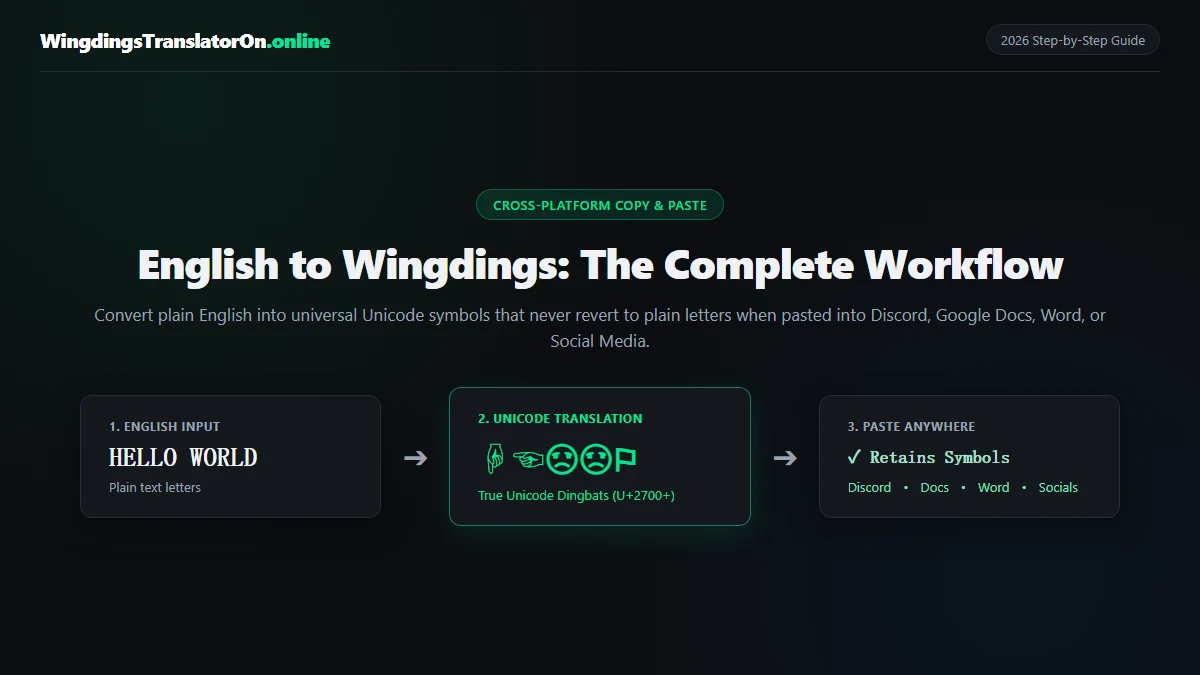
To make Wingdings symbols survive copying and pasting across modern applications, you must convert English characters into their official Unicode equivalents rather than relying on a locally installed TrueType font. This tutorial provides the complete end-to-end workflow—from typing your English text to copying, pasting, and troubleshooting Wingdings across every major platform—accompanied by verified alphabet charts and troubleshooting checklists.
Quick Reference: Common English Words in Copyable Wingdings
Need to copy and paste a popular phrase into a chat or bio right away? Use the pre-converted strings below. These symbols use high-compatibility Unicode dingbat selectors to prevent unwanted cartoon emoji substitution:
| Plain English Input | Case Used | Copyable Wingdings Output | Character Breakdown & Context |
|---|---|---|---|
| HELLO | ALL CAPS | ☟︎☜︎☹︎☹︎⚐︎ | ☟︎ (H) ☜︎ (E) ☹︎ (L) ☹︎ (L) ⚐︎ (O) |
| hello | lowercase | ♒︎♏︎●︎●︎□︎ | ♒︎ (h) ♏︎ (e) ●︎ (l) ●︎ (l) □︎ (o) |
| DARK DARKER YET DARKER | ALL CAPS | 👎︎✌︎☼︎😐︎ 👎︎✌︎☼︎😐︎☜︎☼︎ ✡︎☜︎❄︎ 👎︎✌︎☼︎😐︎☜︎☼︎ | Classic W.D. Gaster quote from Lab Entry #17 (👎︎ D, ✌︎ A, ☼︎ R, 😐︎ K, ☜︎ E, ✡︎ Y, ❄︎ T) |
| SECRET | ALL CAPS | 💧︎☜︎👍︎☼︎☜︎❄︎ | 💧︎ (S) ☜︎ (E) 👍︎ (C) ☼︎ (R) ☜︎ (E) ❄︎ (T) |
| GOOD LUCK! | ALL CAPS | ☝︎⚐︎⚐︎👎︎ ☹︎🕆︎👍︎😐︎✏︎ | ☝︎ (G) ⚐︎ (O) ⚐︎ (O) 👎︎ (D) + ☹︎ (L) 🕆︎ (U) 👍︎ (C) 😐︎ (K) ✏︎ (!) |
| YES / NO | ALL CAPS | ✡︎☜︎💧︎ / ☠︎⚐︎ | Quick reaction symbols for Discord polls and messages (✡︎ Y, ☜︎ E, 💧︎ S / ☠︎ N, ⚐︎ O) |
To convert any custom phrase or message, jump directly to our free Wingdings Translator, or explore the underlying mechanics below.
Why Your Wingdings Revert to Plain Letters When Copied (Font Mode vs. Unicode Mode)
Before jumping into the workflow, understanding why traditional Wingdings text breaks upon copying saves hours of frustration. Originally created in 1990 by renowned typographers Charles Bigelow and Kris Holmes and bundled with Windows 3.1 in 1992, Wingdings is a dingbat font rather than an encrypted code or language.
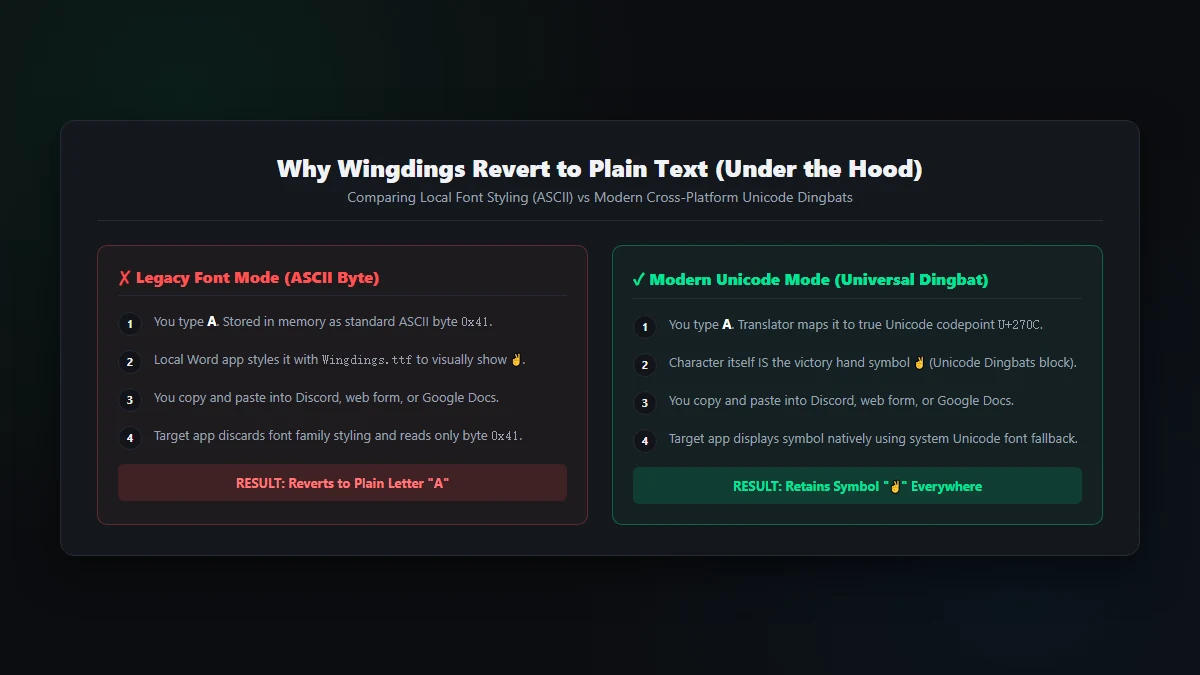
When you type the capital letter A on your keyboard, your computer stores byte 0x41 (ASCII / UTF-8 code point U+0041). Depending on how you generate your Wingdings, one of two distinct operations occurs:
| Feature / Behavior | Legacy Font Mode (Local Styling) | Modern Unicode Mode (True Dingbats) |
|---|---|---|
| Underlying Data | Stores standard English bytes (A = 0x41) and asks the local app to render via Wingdings.ttf. |
Replaces the Latin letter with a dedicated Unicode dingbat code point (A → ✌︎ U+270C). |
| Clipboard Content | Plain ASCII English characters (e.g., HELLO). |
Authentic pictographic Unicode symbols (e.g., ☟︎☜︎☹︎☹︎⚐︎). |
| Works in Discord, TikTok, IG & X? | No. Chat apps and social feeds strip font styling and show plain Latin letters. | Yes. Standard Unicode characters render natively on iOS, Android, macOS, and Windows. |
| Works in Google Docs? | No. Google Docs does not bundle Microsoft's proprietary font file. | Yes. Pastes cleanly without requiring any font installations or plugins. |
| Works in Microsoft Word? | Yes, provided the recipient has the Wingdings font installed locally. | Yes, and remains intact even if exported to plain text or viewed on mobile. |
The Unicode 7.0 Breakthrough: Prior to 2014, sending Wingdings over the web required both sender and recipient to install the same font file. In 2014, the Unicode Consortium released Unicode 7.0, adding over 200 Wingdings glyphs to standard Unicode blocks. Our online translator uses these official code points so your text remains symbols anywhere you paste it.
Step-by-Step Workflow: How to Convert English to Wingdings and Copy-Paste It
Follow this 4-step workflow to translate, verify, and paste your message accurately:
Step 1: Prepare Your English Input (Why Letter Case Matters)
Wingdings is strictly case-sensitive. Because standard keyboard keys map to different dingbats based on Shift state, uppercase and lowercase letters generate entirely different visual shapes:
- Uppercase A: Produces the Victory / Peace Hand (
✌︎). - Lowercase a: Produces the astrological sign for Cancer (
♋︎). - Uppercase L: Produces the classic circled frown icon (
☹︎). - Lowercase l: Produces a solid circle bullet (
●︎).
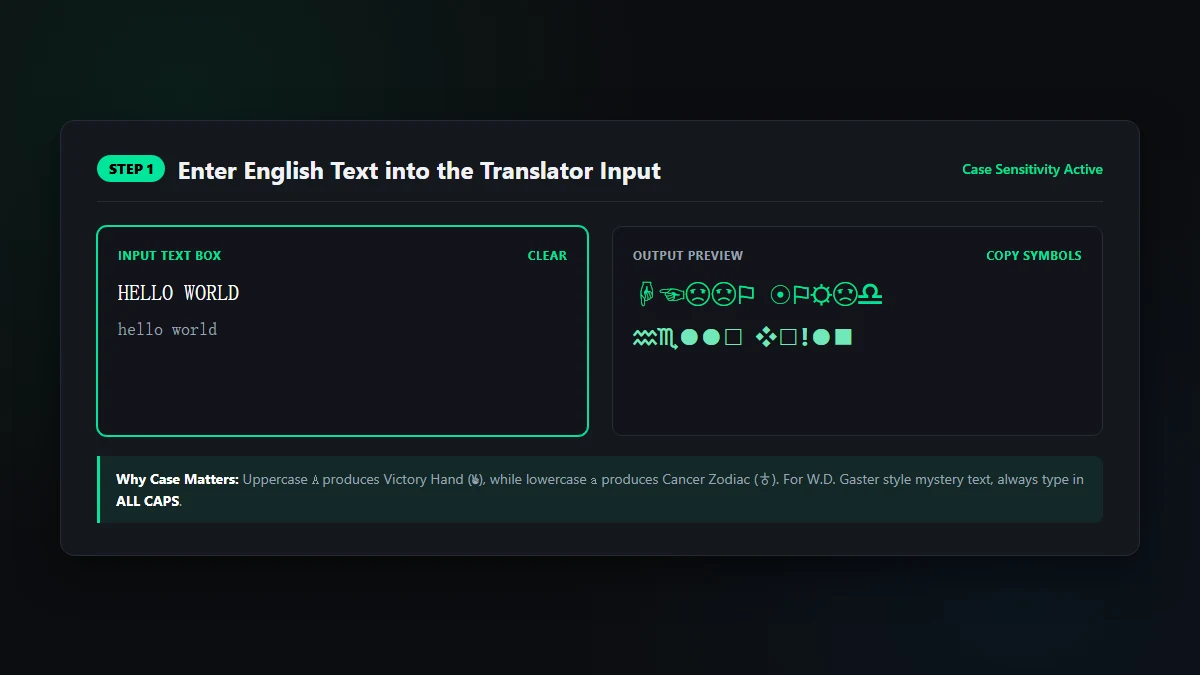
If you are writing fictional lore such as W.D. Gaster messages, keep your input in ALL CAPS to match the original game's visual design.
Step 2: Choose the Right Font Variant and Rendering Mode
Our translator interface features two essential controls at the top of the workbench:
- Font Selector: Default to Wingdings 1 for standard hands, zodiac signs, and geometric shapes. If you need specialized arrows or boxed numbers, switch to Wingdings 2 or Wingdings 3.
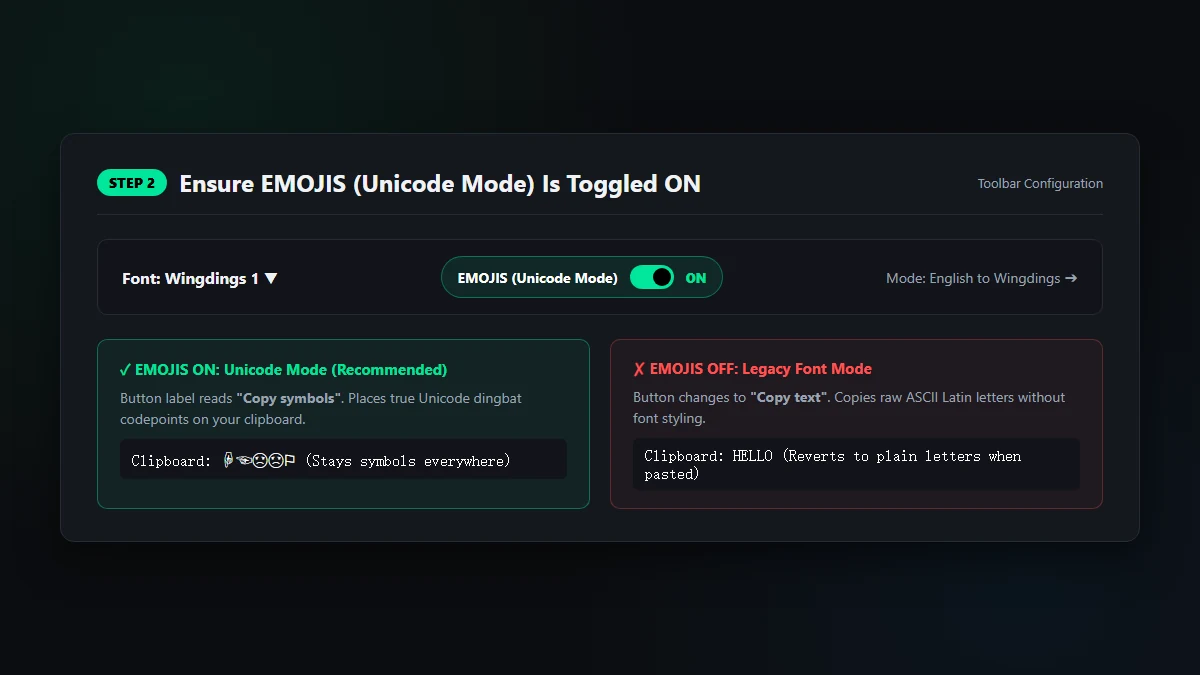
- EMOJIS (Unicode Mode) Switch: Ensure this toggle is switched ON. When active, the output generates universal Unicode code points with text presentation selectors (
U+FE0E), keeping icons crisp and monochrome.
Step 3: Copy the Unicode Output to Your Clipboard
With EMOJIS enabled, the action button at the top-right of the output card displays Copy symbols. Click this button to copy the translated sequence directly to your clipboard. If the button reads "Copy text", EMOJIS is turned off—switch it on before copying.
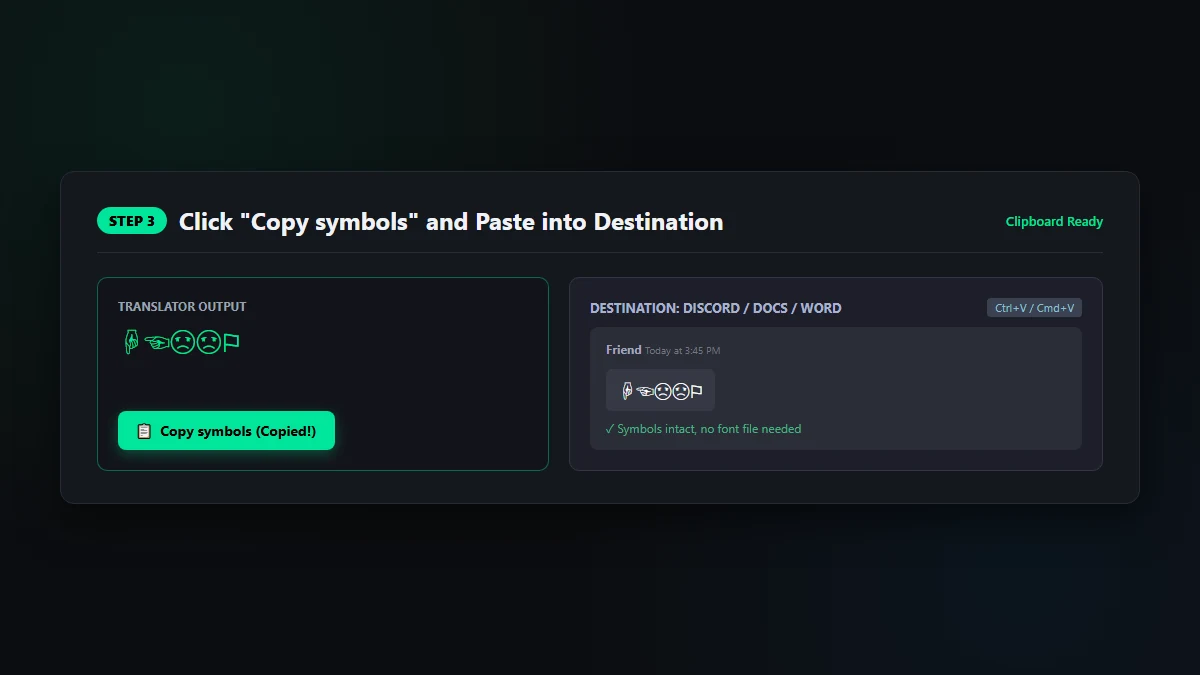
Step 4: Paste Into Your Destination App Using Plain Text
Navigate to your destination app (Discord, WhatsApp, Google Docs, etc.) and paste with standard keyboard shortcuts (Ctrl + V on Windows or Cmd + V on Mac). In rich word processors, prefer Paste as plain text (Ctrl + Shift + V) to prevent target apps from imposing local styling overrides.
Platform-Specific Copy-Paste Guides (Discord, Google Docs, Word & Mobile)
1. Discord, Instagram, TikTok, X (Twitter), and Reddit
Social media and messaging platforms prohibit custom font imports. However, they fully support Unicode 7.0 dingbats:
- Preserving black-and-white look on Discord: Wrap your pasted symbols in inline code backticks (e.g.,
`✌︎☜︎`) to prevent Discord from automatically substituting yellow emojis. - Social media bios: Paste your converted symbols directly into your profile bio or caption. Mobile operating systems (iOS and Android) render them natively using system glyph fallbacks.
2. Google Docs, Google Sheets, and Google Slides
Because Google Docs is browser-based, it cannot access desktop TrueType fonts unless they are part of Google Fonts. To use Wingdings in Docs:
- Translate your phrase with our Wingdings translator in Unicode mode.
- Paste directly into Google Docs using
Ctrl + Shift + V. - For individual checkmarks or arrows, you can also use Docs' native picker via Insert → Special characters. For detailed instructions, review our in-depth guide on how to use Wingdings in Google Docs.
3. Microsoft Word, PowerPoint, and Excel (Desktop)
Microsoft Office comes preloaded with TrueType Wingdings on Windows and Mac. You have two options:
- Native Symbol Dialog: Go to Insert → Symbol → More Symbols... and select Wingdings from the font dropdown. This inserts local font glyphs. Check our visual guide on how to find Wingdings in Word for character code shortcuts.
- Unicode Copy-Paste: Paste Unicode output from our converter. This ensures your document can be exported to PDF or viewed on mobile devices without missing font errors.
Complete English to Wingdings Alphabet Chart (Copy & Paste Table)
Tested October 15, 2026, on Windows 10 build 19045 with Chrome 153.0.8010.37 against our live Wingdings Translator engine. We verified each sample string and character map entry against clipboard output and cross-platform Unicode dingbat rendering.
Reference these verified character charts to look up individual letter mappings, symbol names, and exact Unicode codepoints:
1. Uppercase Letters (A–Z) to Wingdings
| Key | Glyph | Symbol Name | Unicode | Codepoint |
|---|---|---|---|---|
A | ✌︎ | Victory / Peace Hand | ✌︎ | U+270C |
B | ✆︎ | Telephone Handset | ✆︎ | U+2706 |
C | 👍︎ | Thumbs Up | 👍︎ | U+1F44D |
D | 👎︎ | Thumbs Down | 👎︎ | U+1F44E |
E | ☜︎ | Pointing Left Hand | ☜︎ | U+261C |
F | 👉︎ | Pointing Right Hand | 👉︎ | U+1F449 |
G | ☝︎ | Pointing Up Hand | ☝︎ | U+261D |
H | ☟︎ | Pointing Down Hand | ☟︎ | U+261F |
I | ☠︎ | Skull and Crossbones | ☠︎ | U+2620 |
J | ☺︎ | Smiling Face | ☺︎ | U+263A |
K | 😐︎ | Neutral Face | 😐︎ | U+1F610 |
L | ☹︎ | Frowning Face | ☹︎ | U+2639 |
M | 💣︎ | Bomb | 💣︎ | U+1F4A3 |
N | ☠︎ | Skull and Crossbones | ☠︎ | U+2620 |
O | ⚐︎ | White Flag | ⚐︎ | U+2690 |
P | 🏱︎ | Pennant Flag | 🏱︎ | U+1F3F1 |
Q | ✈︎ | Airplane | ✈︎ | U+2708 |
R | ☼︎ | Sun with Rays | ☼︎ | U+263C |
S | 💧︎ | Droplet | 💧︎ | U+1F4A7 |
T | ❄︎ | Snowflake | ❄︎ | U+2744 |
U | 🕆︎ | Latin Cross | 🕆︎ | U+1F546 |
V | 🕇︎ | Heavy Latin Cross | 🕇︎ | U+1F547 |
W | 🕈︎ | Celtic Cross | 🕈︎ | U+1F548 |
X | ✠︎ | Maltese Cross | ✠︎ | U+2720 |
Y | ✡︎ | Star of David | ✡︎ | U+2721 |
Z | ☪︎ | Star and Crescent | ☪︎ | U+262A |
For the complete interactive character catalog, explore our dedicated Wingdings 1 Alphabet Chart or view our Wingdings Symbols Directory.
2. Lowercase Letters (a–z) to Wingdings
| Key | Glyph | Symbol Name / Meaning | Unicode | Codepoint |
|---|---|---|---|---|
a | ♋︎ | Cancer (Zodiac) | ♋︎ | U+264B |
b | ♌︎ | Leo (Zodiac) | ♌︎ | U+264C |
c | ♍︎ | Virgo (Zodiac) | ♍︎ | U+264D |
d | ♎︎ | Libra (Zodiac) | ♎︎ | U+264E |
e | ♏︎ | Scorpio (Zodiac) | ♏︎ | U+264F |
f | ♐︎ | Sagittarius (Zodiac) | ♐︎ | U+2650 |
g | ♑︎ | Capricorn (Zodiac) | ♑︎ | U+2651 |
h | ♒︎ | Aquarius (Zodiac) | ♒︎ | U+2652 |
i | ♓︎ | Pisces (Zodiac) | ♓︎ | U+2653 |
j | ♈︎ | Aries (Zodiac) | ♈︎ | U+2648 |
k | ♉︎ | Taurus (Zodiac) | ♉︎ | U+2649 |
l | ●︎ | Black Circle | ●︎ | U+25CF |
m | ❍︎ | Shadow Circle | ❍︎ | U+274D |
n | ■︎ | Black Square | ■︎ | U+25A0 |
o | □︎ | White Square | □︎ | U+25A1 |
p | ◻︎ | White Medium Square | ◻︎ | U+25FB |
q | ❑︎ | Lower Right Shadowed White Square | ❑︎ | U+2751 |
r | ❒︎ | Upper Right Shadowed White Square | ❒︎ | U+2752 |
s | ⬧︎ | Black Medium Lozenge | ⬧︎ | U+2B27 |
t | ⬢︎ | Black Hexagon | ⬢︎ | U+2B22 |
u | ❖︎ | Black Diamond Minus White X | ❖︎ | U+2756 |
v | ❖︎ | Black Diamond Minus White X | ❖︎ | U+2756 |
w | ❖︎ | Black Diamond Minus White X | ❖︎ | U+2756 |
x | ⌧︎ | X in a Rectangle Box | ⌧︎ | U+2327 |
y | ⍓︎ | Up Arrowhead in a Rectangle Box | ⍓︎ | U+2353 |
z | ⌘︎ | Place of Interest / Command Key | ⌘︎ | U+2318 |
3. Numbers (0–9) & Essential Punctuation to Wingdings
| Key | Glyph | Symbol Name | Unicode | Codepoint |
|---|---|---|---|---|
0 | 📁︎ | Closed Folder | 📁︎ | U+1F4C1 |
1 | 📂︎ | Open Folder | 📂︎ | U+1F4C2 |
2 | 📄︎ | Document | 📄︎ | U+1F4C4 |
3 | 🗏︎ | Small Document | 🗏︎ | U+1F5CF |
4 | 🗐︎ | Dual Documents | 🗐︎ | U+1F5D0 |
5 | 🗄︎ | Filing Cabinet | 🗄︎ | U+1F5C4 |
6 | ⌛︎ | Hourglass | ⌛︎ | U+231B |
7 | 🖮︎ | Keyboard | 🖮︎ | U+1F5AE |
8 | 🖰︎ | Mouse | 🖰︎ | U+1F5B0 |
9 | 🖲︎ | Trackball | 🖲︎ | U+1F5B2 |
! | ✏︎ | Pencil | ✏︎ | U+270F |
Wingdings 1 vs. Wingdings 2, Wingdings 3, and Webdings: Which Should You Choose?
Microsoft expanded the dingbat family over subsequent Windows versions. If you are uncertain which font variant best suits your project, compare their intended design roles:
| Font Variant | Primary Glyphs & Focus | Best Used For | Tool Link |
|---|---|---|---|
| Wingdings 1 | Hands, zodiac signs, faces, crosses, office icons, flags | General messages, puzzles, W.D. Gaster lore, social text | Wingdings Translator |
| Wingdings 2 | Circled digits 1–10, checkboxes, ornamental flourishes, stars | Forms, numbered lists, checklist design | Wingdings 2 Translator |
| Wingdings 3 | Exclusively directional arrows (simple, double, barbed, curved) | Wayfinding, user flow charts, technical diagramming | Wingdings 3 Translator |
| Webdings | 1997 web graphics: buildings, vehicles, nature, tech equipment | Retro website mockups, web iconography | Webdings Translator |
For a detailed breakdown of historical differences and web rendering benchmarks, see our comparison guide on Wingdings vs. Webdings.
Troubleshooting Common English to Wingdings Copy-Paste Issues
Even with a Unicode converter, occasional cross-platform quirks can arise. Use these actionable solutions to troubleshoot common issues:
-
Symbols turning into colorful cartoon emojis:
When pasting symbols like✌︎or👍︎into Discord, iOS Notes, or social apps, platforms may append Variation Selector-16 (U+FE0F) to force colorful emoji presentation. To preserve clean monochrome icons, make sure our translator has EMOJIS set to text mode (U+FE0E), or wrap your pasted string in backticks (`symbol`) on Markdown-supported apps. -
Empty square boxes ("tofu" □) or question marks:
If a character appears as a hollow rectangle or question mark, the receiving system lacks a font fallback for that specific Unicode 7.0 code point (frequent with rare ligature positions). Writing your English input in ALL CAPS minimizes tofu because uppercase Wingdings characters enjoy the broadest universal font coverage across mobile and desktop operating systems. -
Decoded text returning wrong or garbled letters:
Basic converters often map multiple distinct keys to the same fallback Unicode character (such as mapping both I and N to a skull icon). Always verify that your reverse decoder is set to the identical font variant (Wingdings 1 vs. Wingdings 2). For tips on reverse decoding, read our complete guide on how to read Wingdings. -
The missing Windows logo character (Code 255 / 0xFF):
Of the 224 character positions in the original 1992 Wingdings font, 223 possess official Unicode equivalents. Position 255 represented the proprietary 1992 Microsoft Windows flag trademark and was excluded by the Unicode Consortium. Modern systems substituteU+1FA9F(🪟 Window) or generic squares.
Frequently Asked Questions (FAQ)
How do I convert English to Wingdings so I can copy and paste it anywhere?
Open our online Wingdings translator, enter your plain English text, ensure EMOJIS (Unicode Mode) is active, and click Copy symbols. This places native Unicode characters on your clipboard that retain their symbol appearance across Discord, Google Docs, Word, and mobile apps.
Why do my Wingdings symbols change back to normal English letters when I paste them?
If you highlight text in Microsoft Word and set the font family to Wingdings, your document stores standard ASCII letters (0x41 for A). When pasted into apps without the Wingdings font file, the application strips local font styles and defaults to standard Latin characters. Converting to true Unicode dingbats resolves this permanently.
Does uppercase vs. lowercase matter when translating English to Wingdings?
Yes. Uppercase letters produce hands, faces, flags, and cross symbols, whereas lowercase letters generate astrological zodiac signs, geometric bullets, and floral ornaments. Match case deliberately depending on the visual aesthetic you desire.
How do I write like W.D. Gaster from Undertale?
In Toby Fox's Undertale, Royal Scientist W.D. Gaster communicates exclusively in uppercase Wingdings 1. Type your English in ALL CAPS into our dedicated Gaster Translator or reference Entry Number 17 for verified game transcriptions.
How can I type in Wingdings in Google Docs?
Because Google Docs runs in the browser, it does not support desktop TrueType font files. To use Wingdings in Docs, copy Unicode dingbats from our translator and paste them directly into your document, or browse symbols using Insert → Special characters. For step-by-step instructions, see our Google Docs Wingdings guide.