Wingdings 1 vs. Wingdings 2, 3 & Webdings: Full Character Coverage & Exclusive Symbols Guide
If you have ever scrolled through the font dropdown in Microsoft Word or Excel looking for Wingdings 1, you might have noticed something puzzling: you can see Wingdings, Wingdings 2, Wingdings 3, and Webdings, but there is no font explicitly labeled “Wingdings 1.”
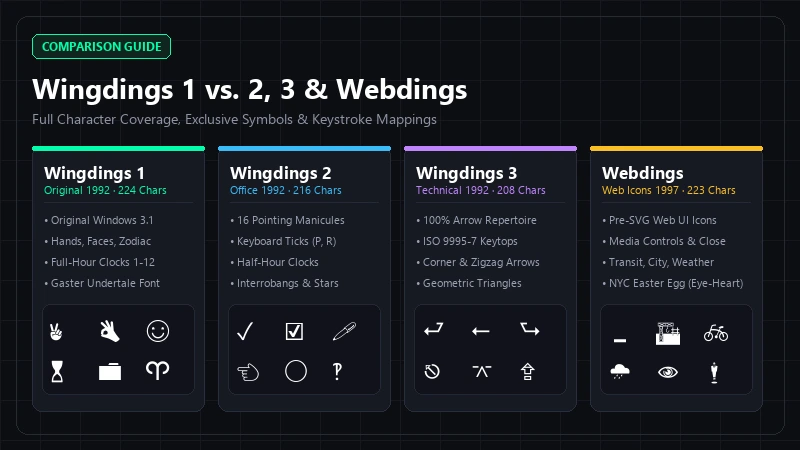
The short answer is that Wingdings 1 is simply the original Wingdings font (Microsoft Learn). When Microsoft released the typeface with Windows 3.1 in 1992, it was named Wingdings (Wingding.ttf), while its two companion packages were numbered Wingdings 2 (Wingdng2.ttf) and Wingdings 3 (Wingdng3.ttf). People retrospectively call the first version “Wingdings 1” to distinguish it from its numbered sequels—especially when using an online Wingdings translator, looking up keyboard shortcuts in Office, or decoding hidden text from pop culture like W. D. Gaster’s dialogue in Undertale (see our guide on what language Gaster speaks and the canonical Entry Number 17).
Understanding how Wingdings 1 (W1), Wingdings 2 (W2), Wingdings 3 (W3), and Webdings divide up their symbol sets will save you from endlessly switching fonts to find a single checkmark, arrow, or UI icon. Below is the complete breakdown of all four versions, their character coverage ranges, and the exact symbols that only exist in one specific version.
What Versions of Wingdings Exist? (W1, W2, W3, and Webdings Compared)
While casual users often group all four fonts together as “the Microsoft symbol fonts,” they come from two distinct design eras and serve different typographical purposes:
- The Wingdings Trilogy (W1, W2, W3): Designed in 1990–1991 by type designers Charles Bigelow and Kris Holmes (originally created as Lucida Icons, Arrows, and Stars to complement their Lucida typeface family) and hinted with tools from Type Solutions, Inc., Microsoft acquired, reorganized, and released the trilogy in 1992 (Wikipedia). You can explore their design roots in our guide to what Wingdings is.
- Webdings: Developed seven years later in 1997 by a Microsoft and Monotype team led by Vincent Connare (who also designed Comic Sans MS and Trebuchet MS) alongside Sue Lightfoot, Ian Patterson, and Geraldine Wade (Microsoft Learn). Bundled with Internet Explorer 4.0 and Windows 98, Webdings was built specifically to give early web designers scalable vector icons for web pages before SVG and icon fonts existed (see our in-depth Wingdings vs. Webdings comparison).
| Attribute | Wingdings 1 (Wingdings) | Wingdings 2 | Wingdings 3 | Webdings |
|---|---|---|---|---|
| Font Menu Name | Wingdings |
Wingdings 2 |
Wingdings 3 |
Webdings |
| Font File Name | Wingding.ttf |
Wingdng2.ttf |
Wingdng3.ttf |
Webdings.ttf |
| Release Year | 1992 (Developed 1990) | 1992 (Developed 1990) | 1992 (Developed 1990) | 1997 |
| Original Designers | Charles Bigelow & Kris Holmes | Charles Bigelow, Kris Holmes & Type Solutions | Charles Bigelow, Kris Holmes & Type Solutions | Vincent Connare, Sue Lightfoot, Ian Patterson & Geraldine Wade |
| Initial Distribution | Windows 3.1 | Microsoft Office & Windows packages | Microsoft Office & Windows packages | Internet Explorer 4.0 & Windows 98 |
| Total Character Count | 224 characters | 216 characters | 208 characters | 223 characters |
| Core Focus | General office supplies, hands, faces, religious & zodiac signs, full-hour clocks, arrows, ballot boxes | Writing tools, 16 pointing hands, keyboard-accessible checkmarks, half-hour clocks, geometric weight gradients | Almost 100% directional arrows, triangles, and ISO keyboard keytop symbols | Early web UI buttons, media controls, weather, buildings, transit vehicles, audio/video gear |
Character Coverage Range Table Across All Four Versions
All four fonts use a legacy 8-bit Symbol character set ranging from decimal code 32 (0x20, Space) up to 255 (0xFF). However, they organize their character slots very differently across standard keyboard keys (! through ~, decimal 33–126) and extended Alt + 0xxx codes (decimal 128–255).
Use the coverage table below to see what types of symbols live in each character block across Wingdings 1, Wingdings 2, Wingdings 3, and Webdings (reference data verified against Alan Wood’s Unicode Character Demos):
| Keyboard / Code Range | Wingdings 1 (Alphabet Chart) | Wingdings 2 (Symbol Chart) | Wingdings 3 (Arrow Translator) | Webdings (Web Translator) |
|---|---|---|---|---|
Top Punctuation! to / (Dec 33–47) |
Office & mail supplies: Pencil (🖉), scissors (✂), eyeglasses (👓), bell (🕭), book (🕮), candle (🕯), phones (🕿, ✆), envelopes (🖂, 🖃), and 4 mailbox states (📪–📭) | Art & desk tools: Ballpoint pen (🖊), fountain pen (🖋), paintbrush (🖌), crayon (🖍), safety scissors (✀), white phone (🕾), handset (🕽), and 7 notepad/page icons (🗅–🗋) | Triangle-headed arrows: 8 cardinal/diagonal arrows (⭠–⭨) plus 7 bar-stop arrows for Tab, Home (⭶), End (⭸), and Page Up (⭻) | Web badges & callouts: Spider (🕷), spider web (🕸), no piracy (🕲), sunglasses (🕶), trophy (🏆), medal (🎖), paperclips (🖇), speech bubbles (🗨, 🗰), hot pepper (🌶), ribbon (🎗) |
Number Keys & Mid-Punctuation0 to @ (Dec 48–64) |
Folders & retro PC hardware: File folders (📁, 📂), pages (📄), file cabinet (🗄), hourglass (⌛), keyboard (🖮), 2-button mouse (🖰), trackball (🖲), old PC (🖳), hard disk (🖴), floppies (🖫, 🖬), tape reel (✇), writing hands (✍, 🖎) | Office peripherals & hands: Clipboard (📋), trashcan (🗑), window (🗔), monitor (🖵), printer (🖶), fax (🖷), CD (🖸), tape cartridge (🖭), 1- & 3-button mice (🖯, 🖱), reversed thumbs (🖒, 🖓), sideways pointing hands (🖘–🖚) | Dashed & corner arrows: Page Down (⭽), bidirectional (⭤, ⭥), 4 dashed arrows (⭪–⭭), zigzag arrow (⭍), 8 L-shaped corner arrows (⮠–⮧), and Return left (⮐) | Window UI & media controls: Minimize (🗕), Maximize (🗖), Tile (🗗), Back/Forward/Up/Down (⏴–⏷), Rewind (⏪), Fast Forward (⏩), Skip (⏮, ⏭), Pause (⏸), Stop (⏹), Record (⏺), Font Size (🗚), Ballot Box (🗳), Tools (🛠) |
Uppercase LettersA to Z (Dec 65–90) |
Gestures, faces, weather & religion: Victory (✌), OK (👌), thumbs (👍, 👎), 4 pointing hands (☜–☟), open palm (🖐), faces (☺, 😐, ☹), bomb (💣), skull (☠), flags (🏳, 🏱), plane (✈), sun (☼), droplet (💧), snowflake (❄), crosses (🕆–✠), Star of David (✡), Crescent (☪) | Pointing hands, checkmarks & ampersands: 14 pointing index and splayed hands (A–N), followed by X marks, checkmarks, ballot boxes (O–X: 🗴, ✓, 🗵, ☑, ☒, ⮾, ⦸), and ornate ampersands (Y, Z) |
Keyboard keytops & UI arrows: Return/Newline (⮑–⮓), paired/opposite arrows (⮀–⮇), U-turn arrows (⮏–⮌), clockwise/counterclockwise (⭮, ⭯), ISO keytops (R–Y: Esc ⎋, Enter ⌤, Ctrl ⌃, Opt ⌥, Space ⎵, Shift Lock ⇪, Caps Lock ⮸), 3D arrow (🢠) |
Buildings, landscapes, senses & audio: Construction (🏗), town (🏘), cityscape (🏙), derelict house (🏚), desert (🏜), factory (🏭), classical building (🏛), home (🏠), beach (🏖), island (🏝), highway (🛣), search (🔍), mountain (🏔), eye (👁), ear (👂), park (🏞), camping (🏕), railway (🛤), ship (🛳), speakers (🕬–🔈), heart (🎔) |
Brackets & Caret[ to ` (Dec 91–96) |
Eastern symbols & early zodiac: Yin Yang (☯), Devanagari Om (ॐ), Wheel of Dharma (☸), Aries (♈), Taurus (♉), Gemini (♊) | Ampersands & interrobangs: 2 ET ligatures (🙲, 🙳) and 4 interrobang styles (‽, 🙹, 🙺, 🙻) | 3D shadowed white arrows: 6 directional shaded white arrows (🢡–🢦) | Chat & loop icons: Thought bubbles (🗬, 🗭), backslash (🙽), 2-bubble chat (🗪), 3-bubble conference (🗫), 4-corner loop (⮔) |
Lowercase Lettersa to z (Dec 97–122) |
Remaining zodiac, geometry & Mac keys: Cancer through Pisces (♋–♓ on a–i), 2 swash ampersands (j, k), circles/squares/diamonds (l–w), Clear (⌧ on x), Escape (⮹ on y), Command (⌘ on z) |
Botanical ornaments & circled digits: 4 bold buds (a–d), 4 vine leaves (e–h), white circled digits 0–10 (⓪–⑩ on i–s), and black negative circled digits 0–6 (⓿–❻ on t–z) |
Shadowed arrows, standard arrows & triangles: Tilted shadowed arrows (a–e), 10 sans-serif arrows (←–🡙 on f–o), and 11 solid/open/corner triangles (▲–◤ on p–z) |
Checkmark, transit, emergency & signs: Checkmark (✔ on a), bicycle (🚲), square (□, ■), shield (🛡), package (📦), fire engine (🛱), ambulance (🚑), info (🛈), plane (🛩), satellite (🛰), levitating man (🕴 on m), boat (🛥), police (🚔), refresh (🗘), close (🗙), help (❓), train (🛲), metro (🚇), bus (🚍), golf (⛳), no-smoking (🚭) |
Braces & Tilde{ to ~ (Dec 123–126) |
Floral & quote ornaments: White/black rosettes (🏵, 🏶) and heavy double quotation marks (🙶, 🙷) | Remaining negative circled digits: Black circled digits 7–10 (❼–❿) | Right triangles: 4 isosceles right triangles (◥, 🞀, 🞂, 🞁) | Anger bubbles & lightning: Left/right anger bubbles (🗮, 🗯), vertical bar (|), lightning bolt (🗲) |
| Lower Extended ANSI Dec 128–191 ( 0x80–0xBF) |
Circled digits, leaves, stars & clocks: Circled 0–10 (⓪–⑩) & negative 0–10 (⓿–❿), buds/vine leaves, rings/targets, 3- to 12-pointed stars, and full-hour clocks 1:00–9:00 (🕐–🕘) | Astronomy, half-hour clocks & shapes: Sun & moon phases (☉, 🌕, ☽, ☾), capitulum (⸿), crosses (✝, 🕇), half-hour clocks 1:30–12:30 (🕜–🕧), and graduated weights of circles, rings, squares, boxes, diamonds | Arrow weight & head families: Small triangles, equilateral arrowheads, and systematic arrow series with small, medium, large, and heavy shafts/heads (including finger-post and notched-tail arrows) | People, sports, finance, docs & gear: Restroom/family (🚹–🚼), alien (👽), 6 sports (🏋–🏄), vehicles (🏍–🚘), finance (🗠, 🛢, 💰, 🏷, 💳), content rating, email/docs, spy (🕵), mantel clock (🕰), arts & audio/video gear (🎭–💻) |
| Upper Extended ANSI Dec 192–255 ( 0xC0–0xFF) |
Clocks, barb arrows, ballot boxes: Clocks 10:00–12:00 (🕙–🕛), ribbon arrows (⮰–⮷), quilt/leaf ornaments, Backspace/Delete (⌫, ⌦), barb/white arrows, ballot X & checkmarks (0xFB–0xFE: 🗶, ✔, 🗷, 🗹), and Windows logo (0xFF) |
Polygons, crosses, saltires & stars: Pentagons, hexagons, and octagons (⬟, ⬣, ⯃), 7 weights of Greek crosses (🞡–🞧) and saltires (🞨–🞮), 5-, 6-, and 8-spoked asterisks, multi-pointed stars, reference mark (※), asterism (⁂) | Heavy arrows & diagonal directions: Heavy white arrows, ribbon arrows, triangular arrows in 16 compass points, and bold geometric pointers | Weather forecast icons & world maps: 13 weather icons (🌣, 🌤, ☁, 🌧, 🌩, 🌪, 🌫, 🌡), Earth globes (🌍, 🌏, 🌎), world map (🗺), directional rockets (🙬–🙯), Dove of Peace (🕊), and musical notes |
Exclusive Symbols Guide: Which Symbols Only Exist in One Specific Version?
One of the most frequent frustrations when working with symbol fonts in Word, Excel, or Google Docs is selecting the wrong font family and finding an empty box or completely mismatched glyph. Here is the definitive breakdown of which symbols are strictly unique to each font.
1. Symbols Exclusive to Wingdings 1 (Wingdings)
As the foundational font included in Windows 3.1, Wingdings 1 contains the original eclectic set of desktop icons and pop-culture staples (browse all Wingdings symbols):
- Pop-Culture Weapons & Hand Gestures: The bomb (💣 on uppercase
M), skull and crossbones (☠ on uppercaseN), V-for-Victory hand (✌ on uppercaseA), and OK hand gesture (👌 on uppercaseB) exist only in Wingdings 1. Webdings features a “No Piracy” skull inside a prohibition circle (🕲 on#), and Wingdings 2 has pointing hands, but neither contains ✌, 👌, 💣, or the standalone ☠. - Full-Hour Analog Clocks (
1:00to12:00, Dec 183–194): Wingdings 1 features the 12 on-the-hour clock faces (🕐 through 🕛), whereas Wingdings 2 contains only the half-hour clock faces (1:30to12:30). - Mac Command (⌘) & Erase Keys (⌫, ⌦): Lowercase
zproduces the looped square Command / Place of Interest symbol (⌘),Alt + 0213produces Erase to the Left / Backspace (⌫), andAlt + 0214produces Erase to the Right / Delete (⌦)—none of which exist in Wingdings 2, Wingdings 3, or Webdings. - Four States of Roadside Mailboxes: Closed and open mailboxes with raised or lowered flags (📪, 📫, 📬, 📭 on
,-./, Dec 44–47), the hourglass (⌛ on6), candle (🕯 on'), and the legacy Windows 3.1 flag logo atAlt + 0255(0xFF). - Zodiac & Religious Symbols: Aries through Pisces (♈–♓ on
^throughi), Yin Yang (☯), Om (ॐ), Wheel of Dharma (☸), and Star of David (✡).
2. Symbols Exclusive to Wingdings 2
Wingdings 2 was released alongside Microsoft Office to expand the document-editing, form-filling, and editorial symbol repertoire (explore the Wingdings 2 Chart):
- Half-Hour Analog Clocks (
1:30to12:30, Dec 135–146): Every:30clock face (🕜 through 🕧) lives exclusively in Wingdings 2, making it the companion timekeeper to Wingdings 1. - Four Interrobang Styles, Reference Mark (※) & Asterism (⁂): Editorial typographers rely on Wingdings 2 for its four distinct weights of the interrobang (‽, 🙹, 🙺, 🙻 on
]^_`), the capitulum paragraph mark (⸿ at Dec 132), the Japanese/editorial reference mark (※ at Dec 248), and the three-star asterism (⁂ at Dec 249). - Fine Art & Classroom Writing Instruments: While Wingdings 1 only has a standard pencil (🖉), Wingdings 2 provides the ballpoint pen (🖊), fountain pen (🖋), paintbrush (🖌), crayon (🖍), and children’s safety scissors (✀ on
!through&, Dec 33–38). - 16 Variations of the Pointing Index (Manicule) & Backhand Gestures: Unlike Wingdings 1 (which only has 4 white cuff-pointing hands ☜ ☞ ☝ ☟), Wingdings 2 features 16 distinct pointing hands—including solid black pointing hands, un-cuffed white backhand pointers (👈, 👉, 👆, 👇 on
>throughM), and sideways pointing variants. - Moon Phases & Astronomical Sun: The astronomical sun with center dot (☉ at Dec 128), full moon (🌕 at Dec 129), first quarter moon (☽ at Dec 130), and last quarter moon (☾ at Dec 131).
- Polygons, 7-Weight Crosses, Saltires & Multi-Spoked Asterisks: Half-circles (◖, ◗), pentagons (⬟), hexagons (⬣), octagons (⯃), 7 graduated weights of Greek crosses (🞡–🞧) and saltires (🞨–🞮), plus 5-, 6-, and 8-spoked asterisks in precise weight gradations.
3. Symbols Exclusive to Wingdings 3
Wingdings 3 is the most specialized font in the family: all 208 of its non-space characters are arrows, triangles, or ISO keyboard keytop symbols (use the Wingdings 3 Translator):
- ISO/IEC 9995-7 Keyboard Keytop Symbols: While Wingdings 1 has Command (⌘) and Backspace (⌫), only Wingdings 3 has the standardized ISO keyboard symbols: Escape (⎋ on uppercase
R), Enter (⌤ onS), Control (⌃ onT), Option (⌥ onU), Spacebar mark (⎵ onV), No-Break Space (⍽ onW), Shift Lock (⇪ onX), and Caps Lock (⮸ onY), plus Horizontal/Vertical Tab arrows (⭾, ⭿ onF,G) and Return/Newline arrows (⮐–⮓ on@throughC). - Specialized Technical & Diagramming Arrows: Dashed arrows (⭪–⭭), the downwards zigzag arrow (⭍ on
7), 90-degree L-corner arrows (⮠–⮧), paired parallel/opposing arrows (⮀–⮇), 180-degree U-turn arrows (⮏–⮌), open-circle circular arrows (⭮, ⭯), 3D shadowed white arrows (🢠–🢫), finger-post arrows (🠴, 🠶), and notched-tail arrows (🢘–🢛). - 19 Geometric Triangle Pointers: Solid, hollow, 45-degree corner (◣, ◢, ◤, ◥), and isosceles right triangles across every orientation.
4. Symbols Exclusive to Webdings
Because Webdings was created in 1997 for early web browsing and multimedia interfaces, its 223 glyphs consist almost entirely of pictorial illustrations absent from the Wingdings trilogy (open the Webdings Translator):
- Window & Media Player UI Controls: Minimize (🗕), Maximize (🗖), Tile/Overlap (🗗), Play/Pause/Stop/Record/Rewind/Fast-Forward/Skip (⏴–⏺ on
4through=), Refresh (🗘 onq), Close X (🗙 onr), and Help ? (❓ ons). - 13 Weather & Temperature Forecast Icons: Sunny (🌣), mostly sunny (🌤), mostly cloudy (🌥), showers (🌦), cloudy (☁), rain (🌧), snow (🌨), lightning (🌩), tornado/twister (🌪), wind blowing face (🌬), fog (🌫), crescent moon with face (🌜), and thermometer (🌡 at Dec 213–225).
- Architecture, Landscapes & Real Estate: Building construction (🏗), town houses (🏘), cityscape (🏙), derelict building (🏚), desert (🏜), factory (🏭), classical public building (🏛), house (🏠), beach with umbrella (🏖), desert island (🏝), motorway (🛣), snow-capped mountain (🏔), national park (🏞), camping (🏕), railway track (🛤), and stadium (🏟 on
AthroughS). - Vehicles, Transit & Emergency Services: Bicycle (🚲 on
b), fire engine (🛱 onf), ambulance (🚑 onh), small airplane (🛩 onj), satellite (🛰 onk), motor boat (🛥 ono), police car (🚔 onp), diesel locomotive (🛲 ont), metro (🚇 onu), oncoming bus (🚍 onv), passenger ship (🛳 onT), motorcycle (🏍), racecar (🏎), automobile (🚘), and 4 directional rockets (🙬–🙯). - E-Commerce, Finance, Hospitality & Animals: Stock chart (🗠), oil drum (🛢), money bag (💰), price tag (🏷), credit card (💳), couch & lamp (🛋), bed (🛏), plate with utensils (🍽), cocktail glass (🍸), bellhop bell (🛎), shopping bags (🛍), wheelchair accessibility (♿), graduation cap (🎓), 3 regional Earth globes (🌍, 🌏, 🌎), world map (🗺), and animals: spider (🕷), chipmunk (🐿), bird (🐦), fish (🐟), dog (🐕), cat (🐈), and Dove of Peace (🕊).
- Famous Designer Easter Eggs: Vincent Connare embedded the famous “Man in Business Suit Levitating” (🕴 on lowercase
m, inspired by the 2 Tone Records ska mascot), a David Bowie Aladdin Sane-inspired lightning bolt (🗲 on~), and theNYC= Eye + Heart + Cityscape sequence (👁 🎔 🏙) as a direct, positive homage to the “I Love New York” slogan.
Quick-Reference Overlap Cheat Sheet: Checkmarks, X Marks & Hands
Many common document symbols appear in more than one font, but at completely different keyboard positions. If you need a checkmark or ballot box for a form in Word or Excel, Wingdings 2 and Webdings put them right on standard letter keys, whereas Wingdings 1 hides them at the very end of the extended character table (Alt + 0251 to Alt + 0254). See our complete tutorial on checkmarks in Wingdings for detailed steps in Microsoft Word and Excel.
| Symbol Type | Wingdings 1 (Wingdings) Shortcut | Wingdings 2 Shortcut | Wingdings 3 Shortcut | Webdings Shortcut |
|---|---|---|---|---|
| Standalone Checkmark (✓ / ✔) |
Alt + 0252 (ü → ✔) |
Uppercase P (✓) |
Not available | Lowercase a (✔) |
| Standalone X / Cross Mark (✗ / 🗙) |
Alt + 0251 (û → 🗶) |
Uppercase O (🗴) or Alt + 0205–0211 (🞨–🞮) |
Not available | Lowercase r (🗙 UI Close) |
| Checked Ballot Box (☑ / 🗹) |
Alt + 0254 (þ → 🗹) |
Uppercase R (☑) |
Not available | ? (🗳 Ballot Box with Ballot) |
| Ballot Box with X (☒ / 🗷) |
Alt + 0253 (ý → 🗷) |
Uppercase Q (🗵), S (☒), or T (☒ bold) |
Not available | Not available |
| Empty Square Box (□) |
Lowercase o (□), p (🞐), q (❑), r (❒) |
Alt + 0163 (⬜) or Alt + 0164–0166 (🞑–🞓) |
Not available | Lowercase c (□) |
| Thumbs Up / Down (👍 / 👎) |
Uppercase C (👍) & D (👎) |
< (🖒 reversed) & = (🖓 reversed) |
Not available | Not available |
| Circled Numbers 0–10 (⓪–⑩, ⓿–❿) |
Alt + 0128–0138 (white) & Alt + 0139–0149 (black) |
Lowercase i–s (white) & t–~ (black) |
Not available | Not available |
Why You Should Use Unicode Instead of Wingdings on the Web
In the 1990s and early 2000s, webmasters often used <font face="Wingdings"> or font-family: 'Wingdings' in HTML and emails. However, specifying Wingdings or Webdings in web markup violates modern standards and fails completely on non-Microsoft operating systems (such as macOS, iOS, Android, Linux, and ChromeOS) that do not pre-install those proprietary font files. When those fonts are missing, your checkmarks, arrows, and stars revert to random Latin letters like ü, P, or a (EduTech Wiki).
Fortunately, in June 2014, the Unicode Consortium released Unicode 7.0, which officially incorporated almost the entire pictographic and geometric repertoire of Wingdings 1, Wingdings 2, Wingdings 3, and Webdings into the universal Unicode character set (with the sole exception of the copyrighted Windows logo at 0xFF in Wingdings 1). You can read our guide on copying and pasting real Unicode symbols to understand how font styling differs from universal text.
Best Practices for Modern Creators
- In Desktop Office Files (Word, Excel, PowerPoint): Use Wingdings 2 (
Pfor ✓,Rfor ☑,i–sfor circled numbers ⓪–⑩) when you want single-keystroke symbols on Windows PCs. See how to find Wingdings in Word for font menu guidance. - On Websites, Notion, Google Docs, Social Media & Emails: Copy and paste the universal Unicode equivalent character (such as ✓
U+2713, ✔U+2714, ☑U+2611, or 🕴U+1F574) rather than applying the Wingdings font family. This guarantees that every recipient sees the intended symbol regardless of device or operating system. Check out Wingdings in Google Docs for cross-platform tips.
Frequently Asked Questions (FAQ)
Is Wingdings 1 the same as Wingdings?
Yes. Microsoft released the original 1992 font under the name Wingdings (Wingding.ttf), without a number. Users and online translators refer to it as Wingdings 1 to distinguish it from its two follow-up fonts, Wingdings 2 and Wingdings 3.
Which Wingdings version does W. D. Gaster use in Undertale?
The hidden character W. D. Gaster in Toby Fox’s indie game Undertale (such as in Lab Entry #17) speaks exclusively in Wingdings 1 (Wingdings), typically using all-uppercase letters (A–Z) along with standard punctuation. If you try to decode Gaster’s text using a Wingdings 2, Wingdings 3, or Webdings chart, the symbols will not match because hands, zodiac signs, crosses, and faces (✌, 👌, 👍, 👎, ☜, ☞, ☝, ☟, 🖐, ☺, 😐, ☹, 💣, ☠, 🏳, 🏱, ✈, ☼, 💧, ❄, 🕆, ✞, 🕈, ✠, ✡, ☪) map to A–Z only in Wingdings 1. You can decode or generate your own messages using our Gaster Translator.
Which Wingdings font is best for typing checkmarks in Excel and Word?
Wingdings 2 is the fastest for typing checkmarks because uppercase P produces a clean checkmark (✓) and uppercase R produces a checked ballot box (☑) right from standard keyboard keys. In Wingdings 1, those same symbols require holding Alt and typing 0252 (✔) or 0254 (🗹) on a numeric keypad. Alternatively, in Webdings, typing lowercase a produces a heavy checkmark (✔). For a complete walkthrough, refer to our Wingdings checkmark shortcuts guide.
Why does typing “NYC” look so different in Wingdings 1 vs. Webdings?
When Windows 3.1 launched in 1992, users discovered that typing uppercase NYC in Wingdings 1 produced a skull and crossbones (☠), a Star of David (✡), and a thumbs-up gesture (👍), sparking controversy that Microsoft strongly stated was an unintentional coincidence of glyph placement. When Vincent Connare designed Webdings in 1997, he intentionally mapped uppercase NYC to an Eye (👁), a Heart (🎔), and a City Skyline (🏙) as a direct, positive homage to the famous “I Love New York” logo.
Conclusion
While “Wingdings 1” does not appear as a numbered item in Microsoft Office font menus, it is alive and well as the standard Wingdings font that launched in 1992. Recognizing the roles of all four legacy symbol fonts—Wingdings 1 for general desktop dingbats, Wingdings 2 for form-filling checkmarks and editorial manicules, Wingdings 3 for comprehensive technical arrows, and Webdings for 1990s web graphics—allows you to pick the right font or copy the universal Unicode equivalent without trial and error.